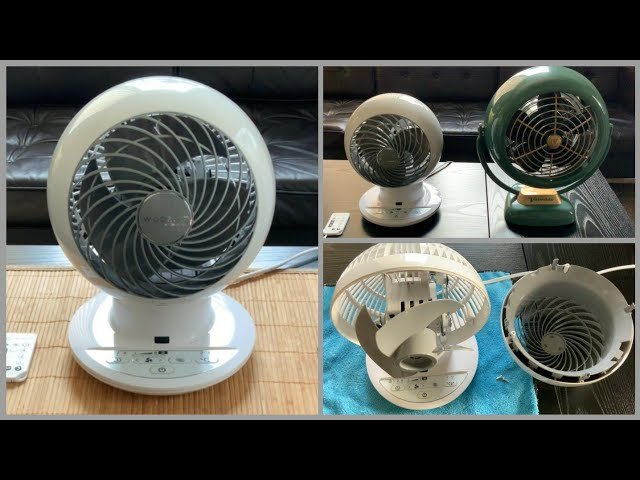
To clean a Woozoo fan effectively, start by disconnecting the power source. Unscrew the front grille and remove the fan blade carefully. Use a damp cloth to wipe the blades and grille, then dry thoroughly. Vacuum the internal components to remove dust buildup. Reassemble the fan and plug it back in. Enjoy a cleaner and more efficient Woozoo fan in just a few simple steps. Keep reading for a detailed guide on how to clean your Woozoo fan like a pro.

How to Clean Your Woozoo Fan: A Step-by-Step Guide
Welcome, fan owners! If you’re reading this, you probably love your Woozoo fan as much as we do. These stylish and powerful fans provide a cool breeze on hot days, but like all fans, they require some TLC to keep them running smoothly. Cleaning your Woozoo fan regularly not only maintains its performance but also prolongs its lifespan. In this comprehensive guide, we’ll walk you through the process of cleaning your Woozoo fan to ensure it stays fresh and efficient. Let’s get started!
Why Cleaning Your Woozoo Fan is Important
Before we dive into the cleaning process, let’s talk about why it’s crucial to keep your Woozoo fan clean. Over time, dust, dirt, and other debris can accumulate on the fan blades and grille, causing the fan to operate less efficiently. A dirty fan can also spread allergens and impurities into the air, affecting indoor air quality. By cleaning your Woozoo fan regularly, you can enjoy cleaner air and optimal performance.
Materials You’ll Need
Before you begin cleaning your Woozoo fan, gather the following materials:
- Soft-bristled brush or vacuum cleaner with a brush attachment
- Microfiber cloth or soft, lint-free cloth
- Mild dish soap or gentle cleaning solution
- Water in a spray bottle
- Cotton swabs
- Old toothbrush
Step 1: Safety First
Before you start cleaning your Woozoo fan, ensure that it is unplugged from the power source to prevent any accidents. Safety should always come first!
Step 2: Removing the Fan Grille
The first step in cleaning your Woozoo fan is to remove the fan grille. Most Woozoo fans have a removable grille that allows easy access to the blades. Refer to your fan’s user manual for specific instructions on how to remove the grille safely.
Step 3: Cleaning the Fan Blades
Once the grille is removed, you can now access the fan blades. Use a soft-bristled brush or a vacuum cleaner with a brush attachment to gently remove dust and debris from the blades. Be sure to clean both sides of the blades thoroughly to ensure optimal airflow.
Step 4: Wiping Down the Grille
Next, take a damp microfiber cloth or soft, lint-free cloth and wipe down the fan grille to remove any dust or dirt buildup. For tougher stains or grime, you can use a mild dish soap or gentle cleaning solution diluted in water. Avoid using abrasive cleaners that could damage the fan’s surface.
Step 5: Cleaning the Base and Controls
Don’t forget to clean the base and controls of your Woozoo fan. Use a damp cloth to wipe down the exterior of the fan and the control panel. For crevices and hard-to-reach areas, you can use a cotton swab or an old toothbrush to remove dirt and debris.
Step 6: Reassembling the Fan
Once you’ve cleaned all the fan components, allow them to dry completely before reassembling the fan. Make sure everything is securely in place before plugging the fan back in and enjoying the fresh breeze.
Regular Maintenance Tips
To keep your Woozoo fan running smoothly, here are some additional maintenance tips:
- Wipe down the fan blades and grille monthly to prevent dust buildup.
- Keep the fan in a clean environment to minimize dirt accumulation.
- Check the fan’s filter regularly and clean or replace it as needed.
- Avoid using harsh chemicals or abrasive materials when cleaning your fan.
By following these cleaning and maintenance tips, your Woozoo fan will continue to provide you with cool, clean air for years to come. Remember, a little bit of cleaning goes a long way in keeping your fan in top shape!
Happy cleaning!
How to Clean Woozoo Fan (Costco)
Frequently Asked Questions
How often should I clean my Woozoo fan?
It is recommended to clean your Woozoo fan every 2-3 months to maintain optimal performance and air quality. However, if you notice a decrease in airflow or the fan blades appear dusty, cleaning may be needed sooner.
What is the best way to clean a Woozoo fan?
To clean your Woozoo fan, start by unplugging it from the power source. Use a damp cloth to wipe down the outer surface of the fan, including the base and control panel. For the fan blades, use a soft brush or vacuum cleaner attachment to remove dust and debris. You can also use a mild detergent solution for stubborn dirt, but be sure to dry the fan completely before plugging it back in.
Can I use water to clean my Woozoo fan?
Yes, you can use water to clean your Woozoo fan, but it is important to be cautious. Avoid getting water inside the fan motor or control panel as it can cause damage. Use a damp cloth or sponge to gently clean the exterior surfaces and fan blades. Ensure the fan is completely dry before using it again.
Final Thoughts
In conclusion, cleaning your Woozoo fan is a simple process that can help maintain its performance. Begin by unplugging the fan and removing the front and rear grilles. Use a damp cloth to wipe down the grilles and fan blades, removing any dust or debris. Be sure to clean the fan regularly to keep it running efficiently. Follow these steps to effectively clean your Woozoo fan and keep it in top condition.